infinite-rss-reader
Infinite RSS Reader for Thunderbird
Infinite RSS Reader is a modern, web-based interface for reading your Thunderbird RSS feeds. It transforms your email client’s RSS data into a beautiful, infinite-scrolling news stream, similar to Feedly or Google Reader, but powered entirely by your local Thunderbird instance.
While technically a Thunderbird extension, the primary goal of this project is to provide a superior reading experience:
- 🚀 Infinite Scroll: Seamlessly browse through hundreds of news items without pagination.
- ⚡ Lightning Fast: Pre-fetches content and renders instantly.
- 🌗 Dark Mode: Auto-detects your system theme for comfortable night reading.
- 📸 Visual-First: Optimized layout for media-rich feeds with one-click screenshots.
- ✅ Auto-Mark as Read: Items are automatically marked as read with visual distinction as you scroll past them.
Table of Contents
- How It Works
- Features
- Prerequisites
- Installation
- Usage
- Technical Architecture
- Troubleshooting
- Privacy & Security
How It Works
This tool bridges the gap between Thunderbird’s robust RSS management and modern web UI standards.
- You run Thunderbird as your RSS aggregator (it handles fetching, storage, and filters).
- Infinite RSS Reader runs a lightweight local server that talks to Thunderbird.
- You open
http://localhost:7654in your favorite browser (Chrome, Safari, Edge) to read your news in a distraction-free infinite stream.
Features
- Infinite Scrolling Stream: No more clicking “Next” or opening individual item. Just scroll.
- Syncs with Thunderbird: Actions are two-way. Scrolling past an item in the browser marks it as read in Thunderbird.
- Distraction-Free UI: Clean, responsive interface built with React and Ant Design.
- Mobile Optimized: Fully adaptive design ensuring a smooth reading experience on mobile phones and tablets.
- Multi-Device Ready: Host on your PC and access via your local network IP to read seamlessly on any device in your home.
- Security First:
- Runs locally on your machine.
- No external servers.
- Sanitizes HTML to prevent XSS.
- Cross-Platform: Works on Windows, macOS, and Linux.
Prerequisites
- Mozilla Thunderbird (version 91.0 or higher)
- Python 3 (3.6 or higher)
- Operating System: Windows, macOS, or Linux
Installation
We provide an automated installer to set up the bridge between Thunderbird and the web interface.
1. Run the Installer
Open your terminal/command prompt in the project directory:
git clone https://github.com/AwesomeDog/infinite-rss-reader.git
cd infinite-rss-reader
python install.py
The installer will:
- Configure the native messaging manifest.
- Install the necessary Thunderbird extension (
.xpi). - Set up the local bridge server.
2. Configure Thunderbird
Since this is a developer tool, the extension is unsigned. You need to enable unsigned extensions:
- Open Thunderbird.
- Go to Settings -> General -> Config Editor (at the bottom).
- Search for:
xpinstall.signatures.required - Set it to
false(double-click). - Restart Thunderbird.
3. Enable the Extension
- Go to Tools -> Add-ons and Themes.
- Find “RSS HTTP API” and ensure it is Enabled.
Usage
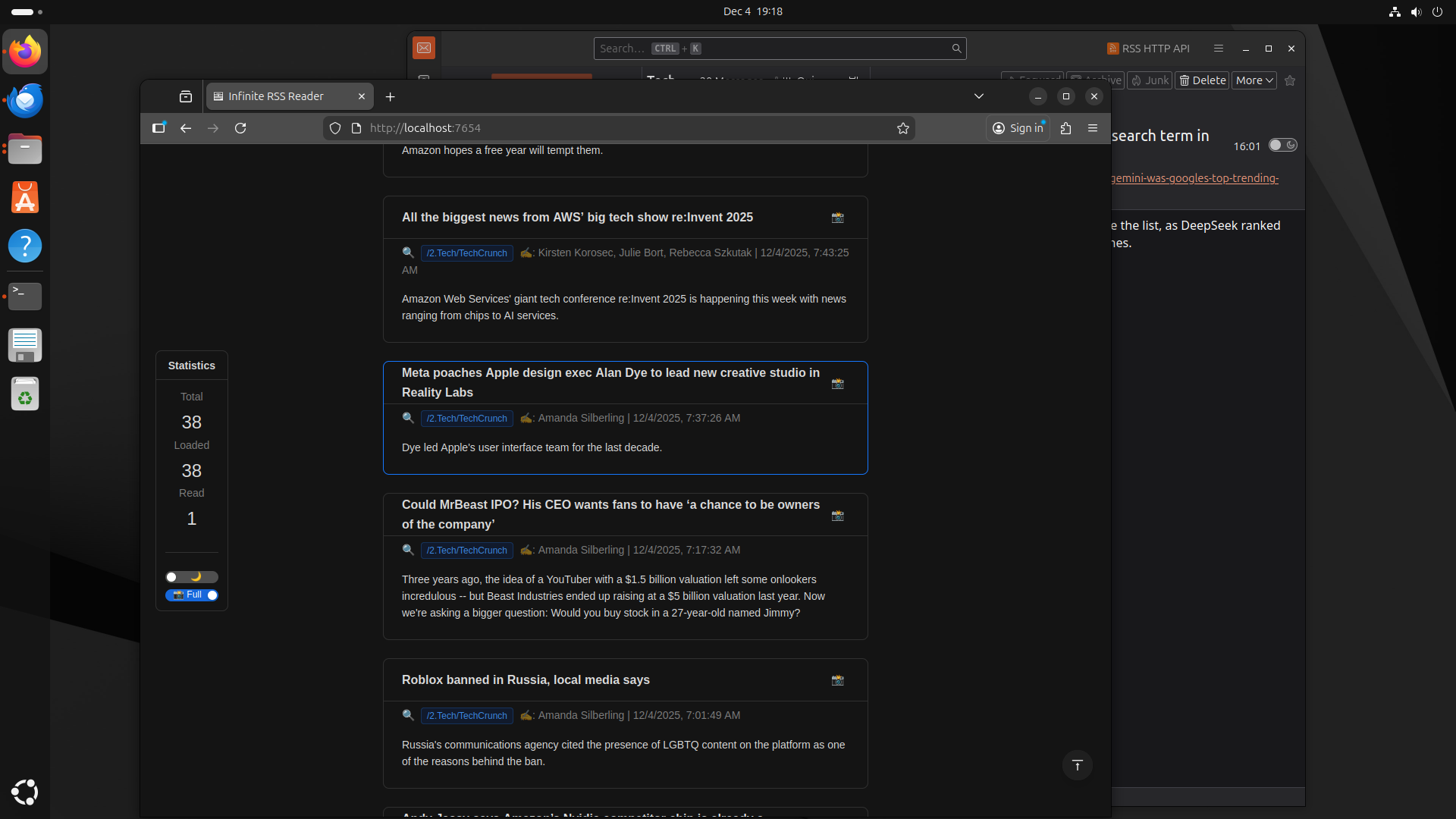
- Start Thunderbird: The bridge starts automatically in the background.
- Open the Reader: Go to http://localhost:7654 in your web browser.
- Enjoy Reading:
- Scroll down to auto load more items.
- Use the Statistics Panel on the left to view reading stats and settings.
- Toggle Theme (☀️/🌙) and Screenshot Mode (Full/Body) in the panel.
- Click the Camera (📸) icon to copy screenshot to clipboard.
- Click the Magnifier (🔍) icon to view source page.
Technical Architecture
For developers interested in how this works:
graph LR
    TB[Thunderbird RSS] <-->|Native Messaging via stdio| Py[Python Bridge]
    Py <-->|HTTP JSON API| Web[React Web UI]
- Frontend: React 18, Ant Design (Single HTML file, no build step required).
- Backend: Python 3
http.server(Standard library only, nopip installneeded). - Communication: Native Messaging API (Stdio) + REST API.
Troubleshooting
“Connection Refused” / Web Interface Not Loading
- Ensure Thunderbird is running.
- Check if the “RSS HTTP API” extension is enabled.
“No Items Found”
- Ensure you have unread RSS items in Thunderbird.
- Check the logs:
- Windows:
%TEMP%\thunderbird_rss_bridge.log - macOS/Linux:
/tmp/thunderbird_rss_bridge.log
- Windows:
Privacy & Security
- Local Only: This tool does not connect to the internet. All data stays on your machine.
- Sanitization: All RSS content is sanitized to remove malicious scripts before rendering.
- Open Source: You can inspect
app/rss_bridge.pyandadd-on/background.jsto verify no data is exfiltrated.
License
MIT License. Feel free to fork and modify!